> For the complete documentation index, see [llms.txt](https://docs.opsnow.io/dev-opsnow-user-guide-kr/llms.txt). Markdown versions of documentation pages are available by appending `.md` to page URLs; this page is available as [Markdown](https://docs.opsnow.io/dev-opsnow-user-guide-kr/opsnow-insight/mcp.md).
# MCP 설치 가이드
OpsNow FinOps MCP를 사용하기 위한 설치 및 설정 절차를 안내합니다. OpsNow FinOps MCP는 AI가 사용자의 클라우드 환경 데이터를 직접 분석하여, 보다 정확하고 깊이 있는 FinOps 인사이트를 제공하기 위한 설정입니다.
1. Claude Desktop을 설치하고 완료 후 실행합니다.\
\- Claude Desktop 다운로드 ([링크](https://www.claude.com/download))
2. Node.js 공식 사이트에서 최신 LTS 버전을 다운로드합니다.\
\- Node.js 다운로드 ([링크](https://nodejs.org/en/download))
3. Claude Desktop 실행 후, 좌측 메뉴에서 설정을 클릭합니다. 개발자 탭을 선택하고 \[구성 편집] 버튼을 클릭합니다.
4. claude\_desktop\_config.json 파일을 열고 편집기로 하단의 설정 내용을 추가합니다.
**\*참고: '설정 내용'은 하단을 참고해주세요.**
* 아래 구성은 MEA 지역을 제외한 모든 지역에 적용됩니다.
```
{
"mcpServers": {
"opsnow-mcp-finops-server": {
"command": "npx",
"args": [
"-y",
"@opsnow-mcp/opsnow-mcp-finops-server",
"--license-key",
"YOUR_LICENSE_KEY"
]
}
}
}
```
* MEA 지역의 경우, 아래의 구성을 사용하십시오.
```
{
"mcpServers": {
"opsnow-finops-mcp-server": {
"command": "npx",
"args": [
"-y",
"@opsnow-mcp/opsnow-mcp-finops-server",
"--license-key",
"YOUR_LICENSE_KEY"
"--region",
"uae"
]
}
}
}
```
* Zscaler 환경을 사용하는 경우, “ZscalerRootCA 인증서 파일”을 삽입하세요.
\**ZscalerRootCA 인증서 파일: 최종 사용자는 관리자로부터 조직의 루트 CA 인증서를 받으시기 바랍니다. 관리자는 조직에 적용되는 루트 CA 인증서(예: Zscaler 루트 CA 인증서 또는 사용자 지정 루트 CA 인증서)를 사용자에게 제공하시기 바랍니다.*
```
{
"mcpServers": {
"opsnow-mcp-finops-server": {
"command": "npx",
"args": [
"@opsnow-mcp/opsnow-mcp-finops-server",
"--license-key",
"YOUR_LICENSE_KEY"
],
"env": {
"NODE_EXTRA_CA_CERTS": "C:\\ZscalerRootCA.pem"
}
}
}
}
```
* 만약 nvm 환경이라 여러버전을 사용할 경우, node 버전 명시적 지정이 필요합니다.
```
{
"mcpServers": {
"opsnow-mcp-finops-server": {
"command": "npx",
"args": [
"@opsnow-mcp/opsnow-mcp-finops-server",
"--license-key",
"YOUR_LICENSE_KEY"
],
"env": {
"PATH": "/Users/xxx/.nvm/versions/node/v22.14.0/bin:/usr/local/bin:/usr/bin:/bin",
"NODE_PATH": "/Users/xxx/.nvm/versions/node/v22.14.0/lib/node_modules"
}
}
}
}
```
5. OpsNow Plus()의 사용자 관리 페이지에서 좌측 ‘Access Keys’ 메뉴 클릭 후, **\[+ MCP 라이선스 발급]** 버튼을 눌러 라이선스키를 발급받습니다.
6. MCP 라이선스 키가 발급을 위해 **\[발급하기]** 버튼을 누릅니다.
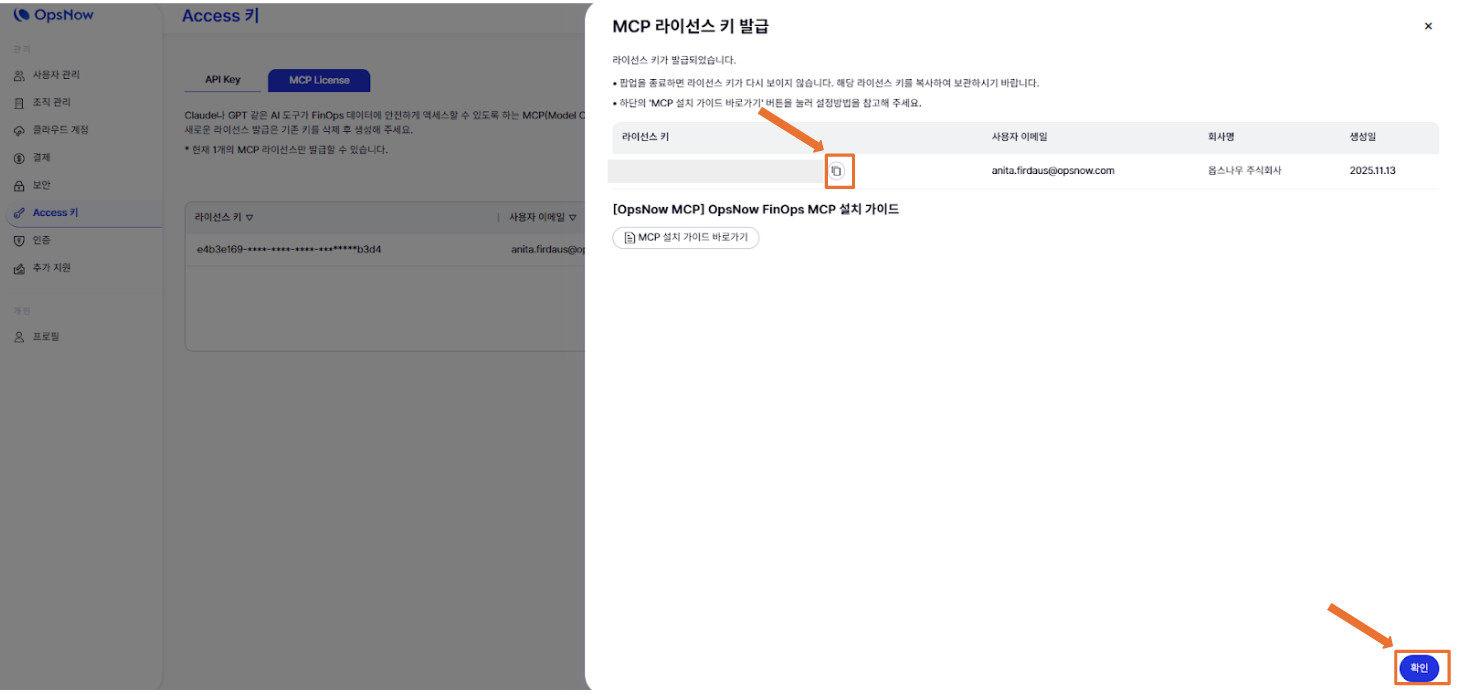
7. MCP 라이선스 키가 발급되면 **\[복사(copy)]** 아이콘을 누르고 **\[완료]** 버튼을 누릅니다.
*\*라이선스 키를 지금 복사하여 저장하시기 바랍니다. 팝업을 닫은 후에는 라이선스 키를 다시 확인할 수 없습니다.*
8. 아래 표에 표시된 대로 MCP 라이선스가 성공적으로 추가되었습니다.
9. 4번의 '설정 내용’으로 돌아가 `YOUR_LICENSE_KEY` 부분에 복사해둔 라이선스 키로 교체합니다.
10. Claude Desktop 앱을 완전히 종료 후 재시작합니다.
11. OpsNow FinOps MCP가 정상 설치되면 아래와 같은 질문으로 시작할 수 있습니다. \
추천 질의 목록
* “내가 사용 중인 모든 클라우드 리소스 리뷰해줘”
* “클라우드 지난달과 이번 달 비교해줘”
* “AWS EC2 비용이 가장 많이 증가한 리전은?”
* “Azure 예약 인스턴스 절감 효과 분석해줘”